TrustZone Demystified: Part 1
My journey into better understanding TrustZone.
TrustZone Demystified
I have a confession… Up until this point, I didn’t have a great understanding of how TrustZone worked.
Here’s where my understanding was at:
- It allowed firmware to be separated into an “S” and “NS” realm
- It was what allowed TF-M to work
- There was some sort of connection between mbedTLS+PSA and TrustZone (via TF-M?)
- When all of the above was configured, I’d get SecureFaults and hardware would fly across the room.
As a firmware engineer in the IoT space, this lack of foundational understanding seemed like a serious problem.
Now, the saving grace in all of this, was Zephyr. I am a HUGE fan of Zephyr. With a couple Kconfig options, I had a safety blanket because pretty much everything required for secure firmware was set up automatically. But, with that, I became complacent. Debugging SecureFaults was hard, because I didn’t really understand what was happening with my firmware. I didn’t have a lot of confidence talking with a client’s security team. I didn’t have a great understanding around all the attack vectors that could be exploited.
So, I set out to better understand TrustZone, and how it plays into ensuring firmware is secure.
Writing about security, or anything adjacent to it, and putting it out for others to read is genuinely a little scary. I am not a security expert. In my day-to-day work I stand on the shoulders of giants: Zephyr handles the heavy lifting, I interact with PSA APIs, and I leverage well-audited libraries rather than rolling my own crypto. So take anything I write with a healthy grain of salt. A boulder of salt, maybe.
What I did want to show is that the fundamentals of TrustZone, the hardware foundation underlying those secure APIs and subsystems, are actually pretty accessible once you get past the initial intimidation factor. More than a tutorial or authoritative guide, this is really a journal of my own exploration into what is happening under the hood of the tools I use every day.
This article aims to give you a solid enough understanding to reason about TrustZone, configure it, and write firmware around it. Along the way, we touch on two key pieces of hardware machinery: the SAU (Security Attribution Unit), which is the programmable unit inside the core that defines which memory regions are S, NS, or NSC; and the GTZC (Global TrustZone Controller), which enforces those boundaries at the bus level for peripherals and memory. Both are covered at a high level here, and in more detail in the companion appendix post.
What is TrustZone
If you’ve used Linux, you’ve seen this idea before: kernel space vs. user space, where user code can’t touch hardware directly and must go through system calls. TrustZone is the same concept applied to microcontrollers.
TrustZone for microcontrollers was introduced with the ARMv8-M architecture, found in cores like the Cortex-M23 and Cortex-M33. At a high level, it is a way to mark some resources of an MCU as accessible only by “Secure (S)” firmware. Essentially, you have two firmware images, one marked “Secure (S)” and the other marked “Non-Secure (NS).” Any resources marked accessible only by S firmware can only be interacted with directly by the S image. If the NS image attempts to access it, a security fault will be raised. If the NS firmware image needs to interact with memory or a secure peripheral, it must do so, indirectly, through a series of entrypoints defined and implemented by the S firmware. These entrypoints are known as Non-Secure Callable (NSC) functions, special functions marked by the S image that the NS image is permitted to call, acting as a controlled gateway into the S world.
Two Addresses, One Resource
One thing that isn’t immediately obvious is that TrustZone doesn’t give you double the RAM or double the peripherals. Every physical resource (SRAM, flash, peripherals) has exactly one set of registers or memory cells. What TrustZone gives you is two ways to address each of them: a non-secure alias and a secure alias.
For instance, the memory mapping on the STM32H563 is as follows:
| Resource | Non-Secure Alias | Secure Alias |
|---|---|---|
| Flash | 0x08xxxxxxxx | 0x0Cxxxxxxxx |
| SRAM | 0x20xxxxxxxx | 0x30xxxxxxxx |
| Peripherals | 0x40xxxxxxxx | 0x50xxxxxxxx |
Think of it like a legal name vs. a nickname: two different ways to refer to the same person. The physical SRAM starting at 0x20000000 and the secure alias at 0x30000000 are the same memory cells.
The alias you use isn’t just a label, though. It determines the security attribute carried on the bus transaction. Accessing an address through the secure alias tags the transaction as “secure.” Accessing through the non-secure alias tags it as “non-secure.” Security enforcement hardware sitting in the bus matrix inspects that tag and either allows or blocks the access based on how the resource has been configured. This is why a non-secure read of a secure resource doesn’t crash: it just returns zeros. The bus matrix intercepts the transaction and returns a dummy response rather than the actual data, and only raises a fault if the hardware is configured to do so.
We’ll see this in action later in the article.
Why is this Important?
Consider something like a robotic lawnmower. There needs to be firmware that can engage and disengage the mower blades. Things can go horribly wrong if those blades spin up when they shouldn’t.
There might be a couple key safety checks that must be satisfied before the blades can be turned on. For instance, the mower must be flat on the ground. There could be a maintenance door that must be closed. The battery temperature must not exceed some limit.
But there is also human interaction. So maybe, from an app, a user can tap “start mowing”, which ultimately calls some function “engage blades.”
The workflow could look something like this:
- User taps “start mowing.”
- Mower firmware checks accelerometer indicating that the mower is on the ground
- Mower firmware checks GPIO pin indicating that the maintenance door is closed
- Mower firmware checks battery temperature indicating that it is not overheating
- Mower sets GPIO pin engaging the blades.
Seems all fine and dandy. But what if there’s a bug in the firmware during any of the steps leading up to step 5? Maybe there’s a stack overflow, and it just so happens to write the address that sets the GPIO pin that engages the blades? That wouldn’t be good.
Or, assuming this is an internet connected device, what if some adversary figures out a way to call the “engage blades” function, bypassing all the safety checks. Again, not good.
So how could something like TrustZone help with this?
The first step would be to mark the peripherals dealing with the safety checks, and the blade engagement as “S” peripherals. So any interaction with the accelerometer, GPIO inputs for interlock switches, temperature sensors, and GPIO output for the blade can only be directly read or written to by firmware executed in “S” mode.
Then, any user interaction, like an engage button or callback from TCP socket when the user presses “start” on their phone, is implemented in “NS” firmware. Now, if the NS firmware tries to write or read directly from the address space associated with those S peripherals, a security fault handler will get called.
If you’ve worked with IoT firmware, a more relevant use case would be dealing with private keys and certificates. The last thing you want is to leak all your juicy secrets. You’ve probably heard of mbedTLS+PSA. There are a wealth of ARM-based MCUs with cryptocells that enable secure storage of keys and fast crypto operations. Here’s where TrustZone, TF-M, and PSA all come together: TF-M runs inside the secure partition and implements the PSA Crypto API there. mbedTLS, running on the NS side, is configured to dispatch all crypto operations to TF-M via PSA calls rather than handling them directly. The result is that private keys never leave the S world, and the NS firmware never has direct access to them.
Let’s See it in Action!
What better way to kick this off than with a simple “Hello World!”
Our target hardware is an STM32H563-based nucleo devkit. This features an M33 MCU with TrustZone.
Hello World!
Before we start, let’s put together a simple “Hello World” image.
Using CubeMX, we configured a bare minimal project with TrustZone disabled and UART3 enabled.
Our application code looks like the following:
1
2
3
4
5
6
7
8
9
10
11
12
13
14
15
16
17
18
19
20
21
22
23
24
25
26
/*****************************************************************************
 * Bindings
 *****************************************************************************/

/**
 * @brief Binding for stdio
 *
 * @param ch Character to write
 * @return Returns 0 on success
 */
int __io_putchar(int ch) {
  HAL_UART_Transmit(&huart3, (const uint8_t *)&ch, sizeof(uint8_t), 1000);

  return 0;
}

/*****************************************************************************
 * Functions
 *****************************************************************************/

void app_entry(void) {
  while (1) {
    printf("Hello World!\r\n");
    HAL_Delay(1000);
  }
}
It’s fairly simple. The entry point runs a while loop that prints “Hello World!” every second.
The __io_putchar function is what gets the output of printf to our UART. We simply transmit each character one by one.
Now, taking a look at the UART terminal, we successfully see our output:
1
2
3
4
5
6
7
8
9
10
11
12
13
14
15
[18:51:55.097] Connected to /dev/ttyACM0
[18:51:55.719] Hello World!
[18:51:56.721] Hello World!
[18:51:57.723] Hello World!
[18:51:58.725] Hello World!
[18:51:59.727] Hello World!
[18:52:00.729] Hello World!
[18:52:01.731] Hello World!
[18:52:02.733] Hello World!
[18:52:03.735] Hello World!
[18:52:04.737] Hello World!
[18:52:05.739] Hello World!
[18:52:06.741] Hello World!
[18:52:07.743] Hello World!
[18:52:08.745] Hello World!
Integrating TrustZone
Now, let’s integrate TrustZone into this simple demo.
I’ve created a new project with TrustZone enabled and I’ve configured UART3 to be initialized in the secure environment.
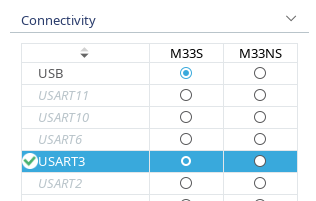 UART3 configured as a secure peripheral.
Additionally, I added some convenience macros for logging, rather than directly calling printf. These macros just add some additional context to the logs for clarity.
TrustZone Project Structure
Let’s take a quick look at the project structure.
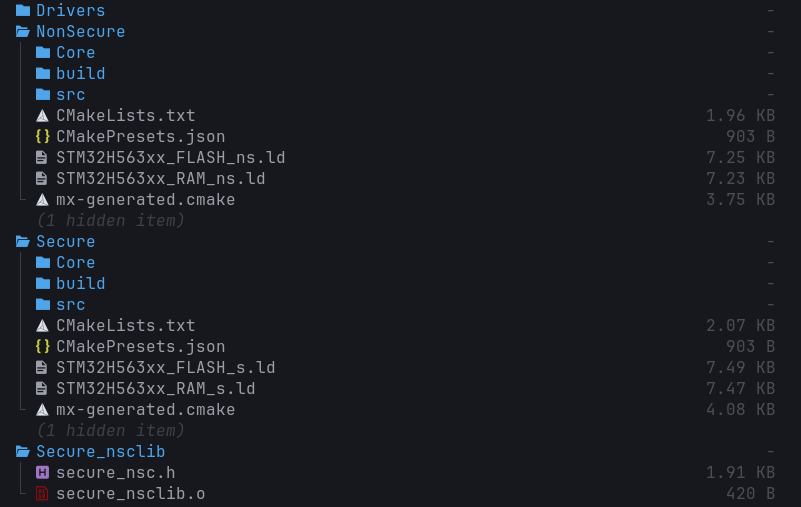 TrustZone project structure.
You can see that there are S and NS firmware targets as well as a Secure_nsclib target.
The S and NS targets are as they seem at face value. The S target is where all the MCU configuration, including the secure peripherals, happens. Additionally, any functionality that should be S only is implemented in this target.
The NS target is where a majority of the firmware for a project would live. For instance, all the business logic and user interaction for a project would be implemented here.
The Secure_nsclib is a static library that gets linked to the NS image. Any interaction that needs to happen between the S and NS images happens through veneers that are compiled into this static library. For instance, any callable functions that the S image wants to expose to the NS image get a veneer. We’ll dive deeper into what this veneer looks like later.
Initial TrustZone Firmware
We can copy over the application code from our original firmware project. However, we need to remove the #include to usart.h and clear out the body of __io_putchar, since UART3 is not enabled in the NS firmware.
1
2
3
4
5
6
7
8
9
10
11
12
13
14
15
16
17
18
19
20
21
22
/*****************************************************************************
 * Bindings
 *****************************************************************************/

/**
 * @brief Binding for stdio
 *
 * @param ch Character to write
 * @return Returns 0 on success
 */
int __io_putchar(int ch) { return 0; }

/*****************************************************************************
 * Functions
 *****************************************************************************/

void app_entry(void) {
  while (1) {
    LOG_INF("Hello from NS World!\r\n");
    HAL_Delay(1000);
  }
}
In the S firmware, we can copy over the original __io_putchar implementation, since UART3 is enabled there.
If we take a quick look at the main.c file of the S firmware, we see a call to NonSecure_Init(). This is what actually starts the NS firmware image.
1
2
3
4
5
6
7
8
9
10
11
12
int main(void) {
  /*
   * Board bring up.
   */
  ...

  /*************** Setup and jump to non-secure *******************************/

  NonSecure_Init();

  /* Non-secure software does not return, this code is not executed */
}
With TrustZone enabled, the S image always runs first. That call will not return (or at least shouldn’t). Unlike a typical bare-metal firmware that sits in a while(1), the S image behaves less like a traditional firmware loop and more like a collection of initialization code, secure services, and handlers. It performs initial hardware setup, hands off to the NS image via NonSecure_Init(), and from that point on is only re-entered through interrupt handlers for secure peripherals or NSC function calls from the NS firmware.
To prove this out, we’ll add our app_entry call before the NonSecure_Init() call, and log that our secure image has started.
1
2
3
4
5
6
7
8
9
10
11
12
13
14
15
16
17
18
19
20
21
int main(void) {
  /*
   * Board bring up.
   */
  ...

  app_entry();

  /*************** Setup and jump to non-secure *******************************/

  NonSecure_Init();

  LOG_ERR("Big yikes...");
  /* Non-secure software does not return, this code is not executed */
}

...

void app_entry(void) {
  LOG_INF("Application started...");
}
Before we can flash this image, we need to set a couple of option bytes that live in the MCU’s flash. The specifics will vary across different MCUs, but for the ST, we need to set an option byte to enable TrustZone, as well as set the watermarking so the MCU knows which portion of flash is designated as the S section, and which is designated as NS.
First, we set the option byte to enable TrustZone:
 Enabling TrustZone.
Then, we need to mark the S and NS sections of flash. The STM32H563 board we’re using has two flash banks, each 1 MB in size. By default, the two images are linked such that the S image lives at the top of the first bank, and the NS image lives at the top of the second. The default option bytes, however, mark the entirety of both banks as S. So if we enable TrustZone and flash the firmware, but don’t update the watermark option bytes, the S firmware will trigger a SecureFault (which can escalate to a HardFault if unhandled) when attempting to execute from the NS flash region.
This is something that tripped me up for a bit, and was a classic case of RTFM. The ST reference manuals say to set the start sector to 0x1 and end sector as 0x0 to mark the entire bank as NS.
We do that, and leave bank 1’s watermarks alone since they’re fine for now.
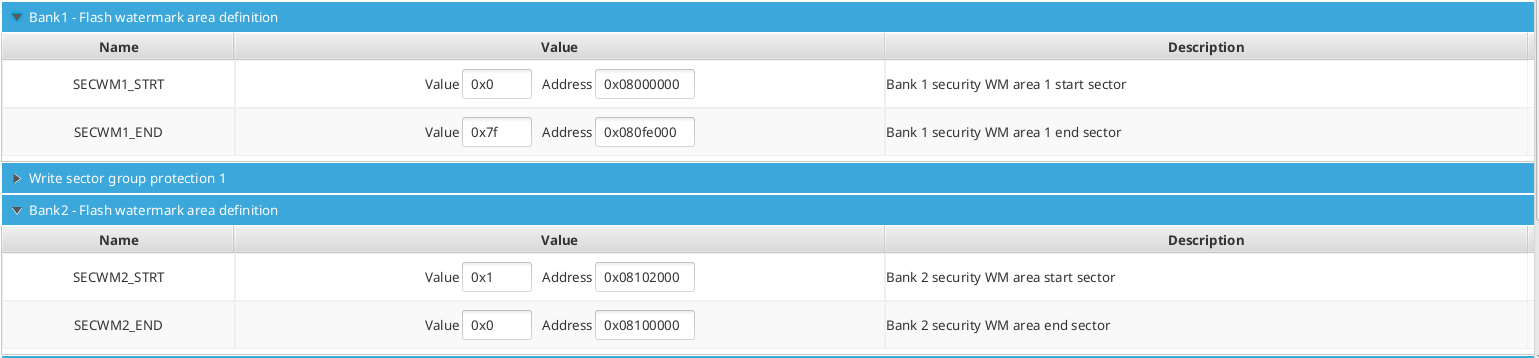 Setting watermarks.
Now, flashing the firmware, we see the following on the UART log:
1
2
[20:23:49.726] Connected to /dev/ttyACM0
[SECURE] INF: Application started...
So, the good news is we see the S firmware booting, and we don’t see “Big yikes…”
However, we don’t see “Hello from NS World!” being printed. This is understandable because we stubbed out the __io_putchar call on the NS side.
Let’s get the two images talking to each other.
Implementing Secure Function Call Veneers
For those who want to understand what is happening at the instruction level, the companion appendix post covers that in detail.
At a high level: for the NS image to “call” a function implemented in the S image, that function needs to have a veneer created. The veneer is a small gateway stub that transitions the processor from NS to S execution mode, validates that the call originated from a legitimate NS execution context, and then jumps to the actual function implementation. The compiler and linker handle generating and placing this stub automatically.
A Quick Metaphor
A somewhat flawed, but applicable analogy is defining some variable as static in a module’s C file. No other translation unit can directly access that variable by name. However, it can be exposed by defining a public getter function. Consider the C file for a module called module_a:
1
static uint32_t prv_counter = 0;
Now say we have module_b that needs to get access to the value of prv_counter. module_b can’t directly call printf("Counter value: %u\r\n", prv_counter);.
So in the header file of module_a we can declare a public getter called const uint32_t module_a_get_counter(void); and implement it as follows:
1
2
3
const uint32_t module_a_get_counter(void) {
  return prv_counter;
}
And now, module_b can call module_a_get_counter() and get the value of the counter.
This is essentially how the S/NS interaction works. A function that is implemented in the S firmware that we want callable by the NS firmware, needs to be publicly declared as callable. A veneer is created, that when called by the NS firmware, puts the MCU into a state that can access the S address space, execute the function, and then return to an NS state.
So for our firmware, we need a callable function that allows us to put a character on the secure UART peripheral.
In secure_nsc.h, we declare the following function:
1
int SECURE_put_char_uart(int ch);
Then, we define this in the S firmware in secure_nsc.c:
1
2
3
CMSE_NS_ENTRY int SECURE_put_char_uart(int ch) {
  return __io_putchar(ch);
}
You’ll notice CMSE_NS_ENTRY. This marks the function as an NSC entry point. The attribute does two things: it instructs the linker to generate a veneer stub in the NSC flash region (the stub that contains the SG instruction and handles the NS-to-S transition), and it tells the compiler to add register scrubbing code to the function epilogue before returning to NS. Both are covered in detail in the appendix post.
Now, in the NS firmware, where we originally had the body of __io_putchar directly write to the UART API, we replace that with SECURE_put_char_uart, which will bubble up through the linkage and call that UART API from the S side.
1
2
3
4
5
6
7
8
9
10
11
12
13
14
15
16
17
18
19
20
21
22
23
24
25
/*****************************************************************************
 * Bindings
 *****************************************************************************/

/**
 * @brief Binding for stdio
 *
 * @param ch Character to write
 * @return Returns 0 on success
 */
int __io_putchar(int ch) {
  SECURE_put_char_uart(ch);
  return 0;
}

/*****************************************************************************
 * Functions
 *****************************************************************************/

void app_entry(void) {
  while (1) {
    LOG_INF("Hello from NS World!\r\n");
    HAL_Delay(1000);
  }
}
Flashing this firmware, we see the following in the UART console:
1
2
3
4
5
6
7
[SECURE] INF: Application started...
[NONSECURE] INF: Hello from NS World!
[NONSECURE] INF: Hello from NS World!
[NONSECURE] INF: Hello from NS World!
[NONSECURE] INF: Hello from NS World!
[NONSECURE] INF: Hello from NS World!
[NONSECURE] INF: Hello from NS World!
And now our NS firmware can interact with the S side!
Going Back the Other Way
Talking to the S world from the NS world is straightforward enough, but going from S to NS is equally important. For instance, an interrupt fired from a secure peripheral might need to cascade down to the NS firmware. Or, the NS image kicks something off on the S side whose completion needs to get reported through a callback.
The dev kit I’m using has a user button, so I configure the button to be connected to a secure GPIO interrupt.
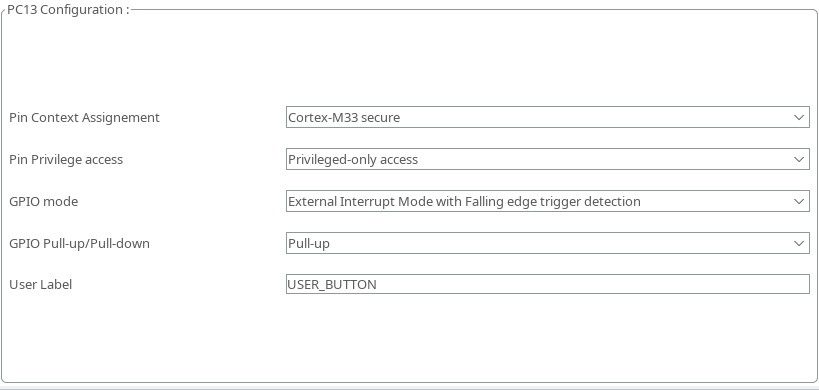 GPIO IRQ configuration.
I add the interrupt handler to the S application, and print out that a GPIO IRQ has fired.
1
2
3
4
5
6
7
8
9
/**
 * @brief GPIO Callback
 *
 * @param GPIO_Pin GPIO Pin that triggered callback
 */
void HAL_GPIO_EXTI_Falling_Callback(uint16_t GPIO_Pin) {
  LOG_INF("GPIO IRQ fired!");
}
And we can see this logged to the console:
1
[SECURE] INF: GPIO IRQ fired!
Now we need to provide a means of getting this to the NS firmware.
The S side does not know the NS callback address at link time, so we can’t hardcode a call target. Instead, we create an NSC function that the NS side can call at runtime to register its callback with the S firmware.
The callback registration is declared as follows:
1
2
3
4
5
6
7
8
9
10
11
/**
 * @brief Typedef for GPIO IRQ Callback
 *
 * @param pin Pin that triggered IRQ
 */
typedef void (*gpio_irq_cb_t)(uint16_t pin);

/**
 * @brief Function to register NS GPIO callback
 */
void SECURE_register_gpio_cb(gpio_irq_cb_t callback);
Followed by the definition, along with a pointer to save the registered callback in the S app:
1
2
3
4
5
6
7
8
9
10
11
12
13
14
/*****************************************************************************
 * Variables
 *****************************************************************************/

/**
 * @brief Pointer to NS IRQ callback
 */
static gpio_irq_cb_t prv_gpio_irq_cb = NULL;

...

CMSE_NS_ENTRY void SECURE_register_gpio_cb(gpio_irq_cb_t callback) {
  prv_gpio_irq_cb = callback;
}
Then, the GPIO IRQ handler gets updated to call the registered callback if it exists:
1
2
3
4
5
6
7
8
9
10
11
12
/**
 * @brief GPIO Callback
 *
 * @param GPIO_Pin GPIO Pin that triggered callback
 */
void HAL_GPIO_EXTI_Falling_Callback(uint16_t GPIO_Pin) {
  LOG_INF("GPIO IRQ fired!");

  if (prv_gpio_irq_cb != NULL) {
    prv_gpio_irq_cb(GPIO_Pin);
  }
}
On the NS side, we define a callback that prints when the IRQ is fired, and register it with the S side:
1
2
3
4
5
6
7
8
9
10
11
12
13
14
15
16
17
18
19
20
21
/**
 * @brief Callback for GPIO IRQs
 *
 * @param pin Pin number
 */
static void prv_gpio_irq_callback(uint16_t pin) {
  (void)pin;

  LOG_INF("GPIO IRQ fired.");
}

void app_entry(void) {
  // Register GPIO IRQ with secure firmware
  SECURE_register_gpio_cb(prv_gpio_irq_callback);

  while (1) {
    LOG_INF("Hello from NS World!");

    HAL_Delay(1000);
  }
}
Time to build and flash. Pressing the button, and… HardFault…
1
2
3
4
5
6
7
[SECURE] INF: GPIO IRQ fired!
[SECURE] ERR: **** Hard Fault ****
[SECURE] ERR:   r0:   0x00002000  r1:   0x00000000
[SECURE] ERR:   r2:   0x00002000  r3:   0x08100dd1
[SECURE] ERR:   r12:  0x0000000a  lr:   0x0c009491
[SECURE] ERR:   pc:   0x08100dd0  xpsr: 0x29000028
[SECURE] ERR:   sp:   0x3004ff50
What happened here? A much more detailed explanation can be found in the appendix post, but just like how the MCU needs to be put into S execution mode before executing S code, the CPU needs to return to NS mode before executing NS code.
It’s extra important that this happens for two reasons. First, any data the S function operated on could still be sitting in the registers when we return, and that data must not leak to the NS firmware. Note that r0 is intentionally left alone since it carries the return value, but r1 through r3 and all floating-point registers are overwritten before the return. Second, and obviously, if NS code were to execute in an S CPU state, it could read or write anything throughout the entire address space.
The fix is to use CMSE_NS_CALL when invoking the function pointer. This is a cast attribute applied at the call site that tells the compiler to generate the register scrubbing and NS state transition before the callback executes. The appendix post goes into what that generated code actually looks like.
So the S GPIO IRQ handler gets updated with the following:
1
2
3
4
5
6
7
void HAL_GPIO_EXTI_Falling_Callback(uint16_t GPIO_Pin) {
  LOG_INF("GPIO IRQ fired!");

  if (prv_gpio_irq_cb != NULL) {
    ((CMSE_NS_CALL gpio_irq_cb_t)prv_gpio_irq_cb)(GPIO_Pin);
  }
}
This looks a bit weird, and there are many other ways to handle this. What’s happening here is the function pointer gets cast to the same type with the CMSE_NS_CALL attribute added, which is what triggers the compiler to emit the transition code.
Running the code again and pressing the button, yields the following on the console:
1
2
[SECURE] INF: GPIO IRQ fired!
[NONSECURE] INF: GPIO IRQ fired.
And all was right with the world!
At this point we’ve got the two images talking in both directions. Now let’s poke at the boundaries and see what happens when things go wrong.
Let’s Break It
Let’s trigger some SecureFaults.
To demonstrate this, I’m going to block out a chunk at the very top of S RAM (address 0x30000000) where we can store the string “Secure RAM.” This way we have a known location that stores a known value for our testing.
1
2
3
4
5
6
7
8
9
10
/* 12-byte zeroed buffer at 0x30000000 for "Secure RAM.\0" (12 bytes, 4-byte aligned).
     Zero this region in startup using _secure_label_start/_secure_label_end before writing to it. */
  .secure_ram_label (NOLOAD) :
  {
    . = ALIGN(4);
    _secure_label_start = .;
    . = . + 12;
    . = ALIGN(4);
    _secure_label_end = .;
  } >RAM
In the S app, we initialize that chunk of RAM with “Secure RAM”, then create two char pointers: one at the S alias (0x30000000) and one at the NS alias (0x20000000). We then print the string value at each.
1
2
3
4
5
6
7
8
9
10
11
12
13
14
15
16
17
18
19
20
void app_entry(void) {
  LOG_INF("Application started...");

  extern char _secure_label_start[];
  extern char _secure_label_end[];
  size_t secure_ram_label_size_bytes =
      (size_t)(_secure_label_end - _secure_label_start);

  memset(_secure_label_start, 0, secure_ram_label_size_bytes);
  char str[] = "Secure RAM.";
  strcpy(_secure_label_start, str);

  // Create pointers to secure alias and non-secure alias.  Subtract 0x10000000
  // because NS RAM starts at 0x20000000 and S is aliased to 0x30000000
  char *s_aliased = (char *)_secure_label_start;
  char *ns_aliased = (char *)(s_aliased - 0x10000000);

  LOG_DBG("String value at %p - %s", s_aliased, s_aliased);
  LOG_DBG("String value at %p - %s", ns_aliased, ns_aliased);
}
Flashing it and the console shows:
1
2
3
[SECURE] INF: Application started...
[SECURE] DBG: String value at 0x30000000 - Secure RAM.
[SECURE] DBG: String value at 0x20000000 -
We correctly see “Secure RAM.” printed when reading from the S-aliased address. However, reading from the NS-aliased address yields all 0s. This is exactly what we described earlier: the bus matrix intercepts the NS transaction to S-configured memory and returns a dummy response rather than the actual data.
Now, in the NS firmware, let’s attempt to read from address 0x30000000:
1
2
3
4
5
6
7
8
9
10
11
12
13
14
15
void app_entry(void) {
  char *s_aliased = (char *)0x30000000;

  LOG_DBG("Attempting to read from %p", s_aliased);
  LOG_DBG("String value at %p - %s", s_aliased, s_aliased);

  // Register GPIO IRQ with secure firmware
  SECURE_register_gpio_cb(prv_gpio_irq_callback);

  while (1) {
    LOG_INF("Hello from NS World!");

    HAL_Delay(1000);
  }
}
Flashing the firmware, we see a SecureFault fire:
1
2
3
4
5
6
7
8
9
[SECURE] DBG: String value at 0x30000000 - Secure RAM.
[SECURE] DBG: String value at 0x20000000 -
[NONSECURE] DBG: Attempting to read from 0x30000000
[SECURE] ERR: **** Secure Fault ****
[SECURE] ERR:   r0:   0x0c0002a1  r1:   0x00100000
[SECURE] ERR:   r2:   0x00000000  r3:   0x00000000
[SECURE] ERR:   r12:  0x00000000  lr:   0x00000000
[SECURE] ERR:   pc:   0x00000000  xpsr: 0x00000000
[SECURE] ERR:   sp:   0x3004ff98
This is expected because we’re trying to read from an S address in NS firmware.
Let’s update the NS firmware to try to directly read from the NS representation of that address, 0x20000000:
1
2
3
4
5
6
7
8
9
10
11
12
13
14
15
void app_entry(void) {
  char *ns_aliased = (char *)0x20000000;

  LOG_DBG("Attempting to read from %p", ns_aliased);
  LOG_DBG("String value at %p - %s", ns_aliased, ns_aliased);

  // Register GPIO IRQ with secure firmware
  SECURE_register_gpio_cb(prv_gpio_irq_callback);

  while (1) {
    LOG_INF("Hello from NS World!");

    HAL_Delay(1000);
  }
}
Let’s flash it and see what happens:
1
2
[NONSECURE] DBG: Attempting to read from 0x20000000
[NONSECURE] DBG: String value at 0x20000000 -
I have to admit, I was expecting a SecureFault when I first ran this code. But as covered earlier in “Two Addresses, One Resource,” this is the default behavior: the bus matrix returns zeros for NS transactions to S-configured memory, and only raises a fault if explicitly configured to do so. The memory is protected, but the data is simply not handed over.
So let’s do this the other way. Let’s section off a chunk of NS memory and read it from the S side.
Our NS RAM starts at 0x20050000, so we add a similar section in our linker script to section off some RAM:
1
2
3
4
5
6
7
8
9
  .ns_ram_label (NOLOAD) :
  {
    . = ALIGN(4);
    _ns_label_start = .;
    . = . + 16;
    . = ALIGN(4);
    _ns_label_end = .;
  } >RAM
Just like what we did in the S app, we initialize this RAM with the string “NonSecure RAM.”
1
2
3
4
5
6
7
8
9
10
11
12
13
14
15
16
17
18
19
20
void app_entry(void) {
  extern char _ns_label_start[];
  extern char _ns_label_end[];
  size_t ns_label_size = (size_t)(_ns_label_end - _ns_label_start);

  memset(_ns_label_start, 0, ns_label_size);
  char str[] = "NonSecure RAM.";
  strcpy(_ns_label_start, str);

  LOG_DBG("String value at %p - %s", (void *)_ns_label_start, _ns_label_start);

  // Register GPIO IRQ with secure firmware
  SECURE_register_gpio_cb(prv_gpio_irq_callback);

  while (1) {
    LOG_INF("Hello from NS World!");

    HAL_Delay(1000);
  }
}
In the S firmware, we add some code to print the value at the S alias and NS alias:
1
2
3
4
5
6
7
8
9
10
11
12
13
void HAL_GPIO_EXTI_Falling_Callback(uint16_t GPIO_Pin) {
  LOG_INF("GPIO IRQ fired!");

  char *ns_aliased = (char *)0x20050000;
  char *s_aliased = (char *)(ns_aliased + 0x10000000);

  LOG_INF("String value at %p - %s", ns_aliased, ns_aliased);
  LOG_INF("String value at %p - %s", s_aliased, s_aliased);

  if (prv_gpio_irq_cb != NULL) {
    ((CMSE_NS_CALL gpio_irq_cb_t)prv_gpio_irq_cb)(GPIO_Pin);
  }
}
Let’s flash it and see what happens:
1
2
[SECURE] INF: String value at 0x20050000 - NonSecure RAM.
[SECURE] INF: String value at 0x30050000 -
We can see that we successfully read the value when reading from the NS alias, and it’s zeroed out when reading from the S alias.
Interestingly, this is the opposite of what happened when we tried to read from the NS alias of the secure label (0x20000000) from our S firmware.
This behavior has a name: RAZ/WI (Read As Zero / Write Ignored). It is the ARM term for when the bus matrix intercepts an access where the security attribute of the address doesn’t match what the accessor is permitted to see and, rather than faulting, returns zeros on reads and silently drops writes. The mechanism is symmetric: NS firmware reading S-attributed memory via the NS alias gets RAZ/WI, and S firmware reading NS-attributed memory via the S alias gets the same treatment in reverse.
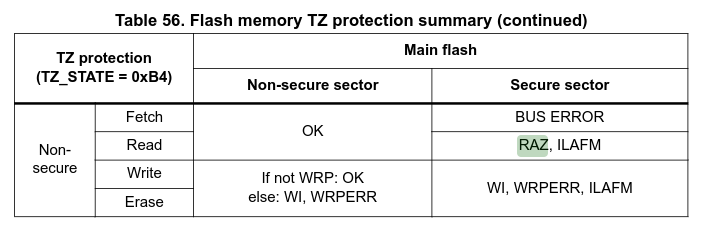 A quick note: this diagram specifically illustrates RAZ/WI for flash reads. The RAM behavior observed here follows the same principle, but the exact conditions under which a cross-attribute access produces RAZ/WI versus an actual fault can vary by resource type, hardware configuration, and vendor. If you’re depending on this behavior in production firmware, verify it against your specific hardware’s reference manual and test it experimentally.
When I started this, I initially assumed that since the S firmware has access to the entire address space, reading from either alias would yield the same results. That assumption turns out to be wrong, and for a good reason. Consider a secret value that your S firmware writes to RAM. If a pointer calculation goes wrong and the S firmware accidentally writes to 0x30050000 (the S alias of NS RAM at 0x20050000), RAZ/WI prevents the write from landing in NS-accessible memory. The write is silently dropped rather than leaking the secret into NS address space. That’s a useful property, but it’s a consequence of how the security attribute enforcement works symmetrically across the boundary, not a special case the hardware added specifically for accident protection.
Wrap it up
At its core, TrustZone is a hardware-enforced security attribute on every bus transaction. The address you use determines whether a transaction is tagged S or NS, and the hardware decides whether to allow it, return zeros, or raise a fault. Everything else (the project structure, the veneers, the CMSE_* attributes) is just tooling built on top of that foundation.
I feel like this is a good place to stop. In the next couple of articles we’ll start doing some more applicable stuff with TrustZone, such as interfacing with the cryptocells, demonstrating how TrustZone is used by projects such as TF-M and mbedtls+PSA.
As mentioned throughout the article, there is an appendix post which dives deeper into the inner workings of the MCU and some of the assembly that is generated in some of the code throughout this article.
Additionally, all the code seen in this article is on GitHub, so you can see it in its full context and play around with it.
Finally, I’m by no means an expert in all of this, so if I got anything wrong, please let me know! I’ll make sure it gets corrected.